Anodos
As a kid, I distinctly remember being told I was in charge of map reading on a long drive to a family holiday destination.
My dad used to have this old AA map that had frayed edges from being stuffed between the front passenger seat and the centre console and I would love trying to work out where we might be based on the signs and what I could see on the map. I found it fun to trace my finger to the edge of a given page, and then after turning what seemed like an arbitrary number of pages backwards (never 1 page somehow), I could continue my tracing along the same road.
There was a certain sense of wonder to be able to see what road might be coming up, where there might be a castle, or services etc and in a way, it was a type of spatial discovery.
Unknown Parts
It seems my interest in maps was shared with my dad, and he loved to collect old maps.
Various maps lined the walls of the hall at our family home, and there were a few that really piqued my interest.
There was a fairly large map of Africa, with areas in the north drawn out showing towns and docks etc and some of the south of the continent, like Cape Town and other neighbouring towns also on the map.
In the centre of the continent however, was a large blank area with "Unknown Parts" hand-written in the centre.
This isn't a photo of the exact map, but is similar in a lot of ways:
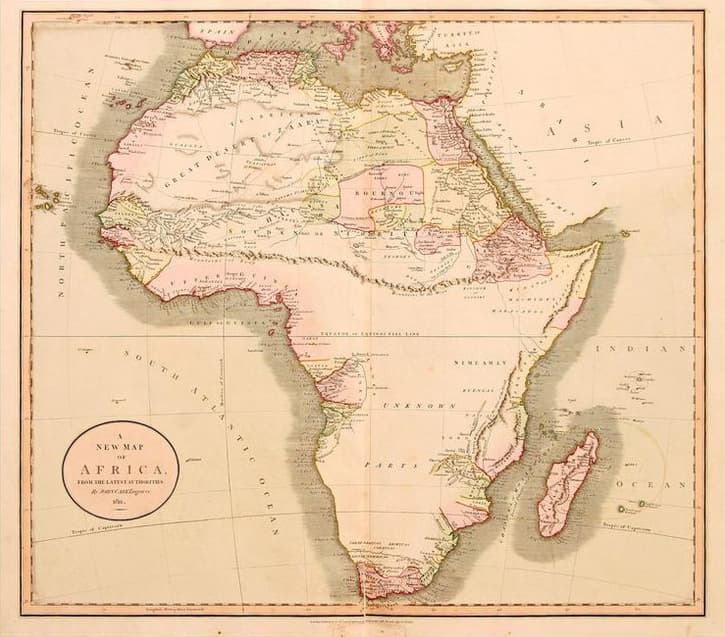
This to me was one of the coolest things. Can you imagine knowing that there is an area nearby that you haven't explored? I think as a young kid, I naively assumed that maps were universal, and that genuinely, that was undiscovered land, but I suppose I grew up to realise that in the context of the map painter, and to the best of their knowledge, this was indeed undiscovered, but no doubt it had been wandered by humans for thousands of years.
Either way, the concept of "Unknown Parts" was just awe-inspiring.
Google Location History
Whilst I was working at Dyson, I discovered my fascination with programming, and mainly creative programming.
I am not sure exactly what caused me to start this next project, but I certainly know it was well before the concept of AI assisted coding, so I remember it being a real battle and a pain in the arse.
This was in the era when GDPR came into play. We had to scramble as a team to collect and document any identifiable information about test participants and other information we held as a team about people and collaborate with the legal team to make sure all of that was documented effectively.
This got me thinking the other way around. What data do other companies have about me, that I could request legally?
I discovered Google Takeout and remembered that I had Location History turned on in Google Maps.
In fact, the feature had been turned on for 7 years, and had in fact proved quite useful on a number of occasions. There must be soooo much data. Could I download it? What would it look like? What could I do with it?
I requested the data, and a little while later, I got an email stating my download was ready. I eagerly downloaded it, really not sure what I would find, and discovered quite a remarkable amount of data.
One of the most interesting things I found was about data structure. I hadn't ever really given much thought to how to structure data, but I seem to remember being fascinated by how Google has structured this data before sending it to me.
Anyway, I digress. The data showed me 1000s of "activities", each with a likely type: "Driving", "Walking" and curiously "Skiing", among a few other types.
I'd been playing with NumPy at the time and Python and decided I'd try to parse something interesting from the data.
Each activity had a series of GPS coordinates and some other metadata bundled with the activity.
I wondered what it would take for me to map all this data myself, onto a map on my computer.
OpenStreetMap
I managed to build a python script that could draw me a map plotting all of those coordinates. I loaded it and it was a mess. I was surprised how fast it loaded, but it was basically just a swarm of points covering the underlying map surface.
After some googling, I discovered a concept called a polyline. This appeared to be a geospatial polygonal line of sorts.
I wrote another function in my script that would convert each of the Activities into its own polyline, and then draw those on the map instead of points. Much prettier.
This really showed me the scale of the data that Google had about my location, but it hadn't really fazed me at the time.
Problem was, as I zoomed in, the data seemed too low resolution. What I mean by that, is the polylines just didn't have enough points. The lines cut corners, careered through houses and buildings and just didn't really represent where I had actually been.
I needed to fit it to the roads.
Project OSRM
Project OSRM is an Open Source Routing Machine. It can return a precise route of points between 2 (or more) points on a map as a set of coordinates.
So, I dived in. I worked out how to download this tool, run it locally, and worked out how to pass a series of GPS coordinates in, and get another, longer set out. I could also convert this, using my trusty function, to a polyline.
The problem was, you had to download a region of the world to pass into the instance for it to use for calculation. Naturally I downloaded the UK one.
After admiring my work and now seeing all my routes drawn perfectly aligned to roads, I was super pleased.
Land's End
I wanted to get some more insight out of this spider's web of lines, so I decided to update the shader for the line to be a 20% opacity blue. I also changed the background style of the map to be far more subtle. This resulted in roads that I travelled over often having a solid blue line, whereas roads I had only travelled a few times, showing a much paler blue.
This added a new 3rd dimension to my data and I stared at it for a while. Rediscovering trips I had done and memories made there, but something stood out.
There appeared to be a roundabout in the very south-western tip of the UK that I had driven around 100s of times.
I didn't remember a maddening trip like that, and strangely, there wasn't a blue line going to that destination either.
I puzzled over this for a while, even going back in to my Location History on Google to see if there was some error in my dataset, but it soon clicked, and I realised what had happened.
In downloading only the UK as my Routing Canvas, the algorithm would try to find the nearest road that each GPS point could snap to.
Turns out the nearest road to Buenos Aires was Land's End in Cornwall. Same with Porto. In fact, any trip that I had taken outside of the UK would bundle all its points on the nearest road.
I soon realised that I should just trim the input data to remove anything outside the UK, and then the resulting map was nice and clear.
The sad thing is, this was all experimental, and also performed on my work laptop, so not something I could show friends or push to GitHub, so hence why there are no code snippets or images. A shame really, as I would love to revisit that project one day.
Skip to 2026
As a kid, I had played many games, including Age of Empires. I probably sunk 100s of hours into the second version of that game and one of the delightful features of it, was the fog of war.
As your scout ventured out, it revealed part of the map, and thereby discovered new lands, resources and sometimes, enemies.
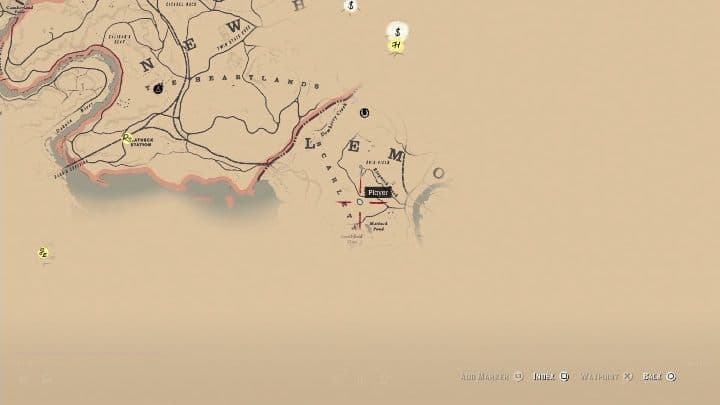
I rediscovered the joy of this whilst playing Red Dead Redemption II at the start of this year and became fascinated once again by the map. It was huge, and all hidden. I had no idea what there was to discover in what turned out to be one of the richest open world games I'd ever played.
It was then, I wanted to combine my curiosity for building, and fascination with maps and more importantly, exploration to create something fun.
Modern mapping is practical, not joyful
Whilst thinking about mapping generally, it occurred to me that applications like Google Maps could show you everything, in immense detail, even if you'd never been there, or even if you would never go there.
The whole world had been discovered.
Even the ocean floor had been mapped and presented on the map.
Although this was immensely practical, there was something missing.
Thinking back to the Africa map at my parents' house, the main thing I remember about it is the "Unknown Parts".
Google Maps has erased all of that.
Could I bring it back?
Let's build.
I started this project by trying to get the basics. A map running on my phone, that I could pan, zoom etc and importantly, didn't cost me anything.
I knew OpenStreetMap was a free map service, but crucially, it wouldn't host the tiles for you to consume.
I found another site that generously appears to host the tiles for free, with a fair-use policy: OpenFreeMap.
Founded in 2004 by Steve Coast who was frustrated that Ordnance Survey (the UK's national mapping agency) charged for access to taxpayer-funded geographic data.
The idea was to create a free, editable map of the world — essentially Wikipedia for maps.
It's run by the OpenStreetMap Foundation, a UK-registered non-profit, funded by donations and corporate memberships.
What a legend.
I pulled all that together and after a few false starts, built the app and it appeared on my iPhone.
I had used MapLibre (another free alternative to a popular paid map tool) to render the tiles and I could pan and zoom and all sorts on my phone! Nice
Revealing
In my mind, remembering the games, I assumed that the areas revealed would just be raster masks placed on top of the map. Pinned to the corners of each tile, one bitmap per tile.
I moved forward with that approach, and drew a random pattern on a bitmap, passed that into the code, and asked the Map Engine to render that over the top of the map.

It did so, and then I worked out how to make that a mask for a solid colour layer instead.
That also worked, but I came across a problem. As I zoomed and panned quickly, the mask would disappear, revealing the mysterious undiscovered land across the road for a split second, and then cover it again. NOT GOOD ENOUGH.
The way I understand the pipeline works is as follows:
Request comes in for a new tile, at a given zoom level. Request fired off to OpenFreeMap, which graciously returned the tile, that tile was passed to the map engine, it's drawn on the canvas, and then the image is loaded and drawn on top.
The timing between those last 2 steps was too long. I needed another approach.
I built a solution that actually intercepted the data coming from OFM, and overlaid the mask before passing it to the canvas.
Nice.
That worked much better. Problem was, the revealed map mask was a little pixelated, and I also thought there must be a better way to store the data than a bitmap.
What if the user wanted to remove a trip? Could I reverse that mask update in the future?
Wait, I hadn't even hooked it up to actual walks yet, so that was the next task.
One step at a time
Recording walks
I like the idea of open source stuff, but I also like the idea that you don't have to share your data with others to get value out of it.
I had sort of realised this when building the previous, google data derived map project. Run it locally, nobody else needs my data.
So how do you do this when tracking where people are walking? Surely I can just store their location locally on device, and never send it to a server.
Anyways, servers are expensive, so let's aim for an on-device solution as much as possible.
I built a tracking function that would record your precise location every few seconds, and discard any value that was less than 2m away from the last point. This way, I would have an array of GPS points by the end of a walk that I could work out how to use to mask the bitmap.
This worked quite well, and I started by just cutting out a 2m radius circle from the bitmap for every point. This sort of worked too, and would create a masked fog. I was quite happy all in all.
I didn't really want people to accidentally leave this app running in the background tracking all these points without them knowing, so I also learnt how to create a Live Activity to keep the user aware that things were happening.
Styling
The map at my parents' house and the Red Dead Redemption map shared styling cues.
They appeared as if they had been drawn on some parchment by cursive black ink.
Various different line styles had been employed to represent different features, and I wanted to re-create that myself.
I found a remarkable article by someone called Lee Martin, who had managed to recreate the RDR2 map in MapBox Studio.
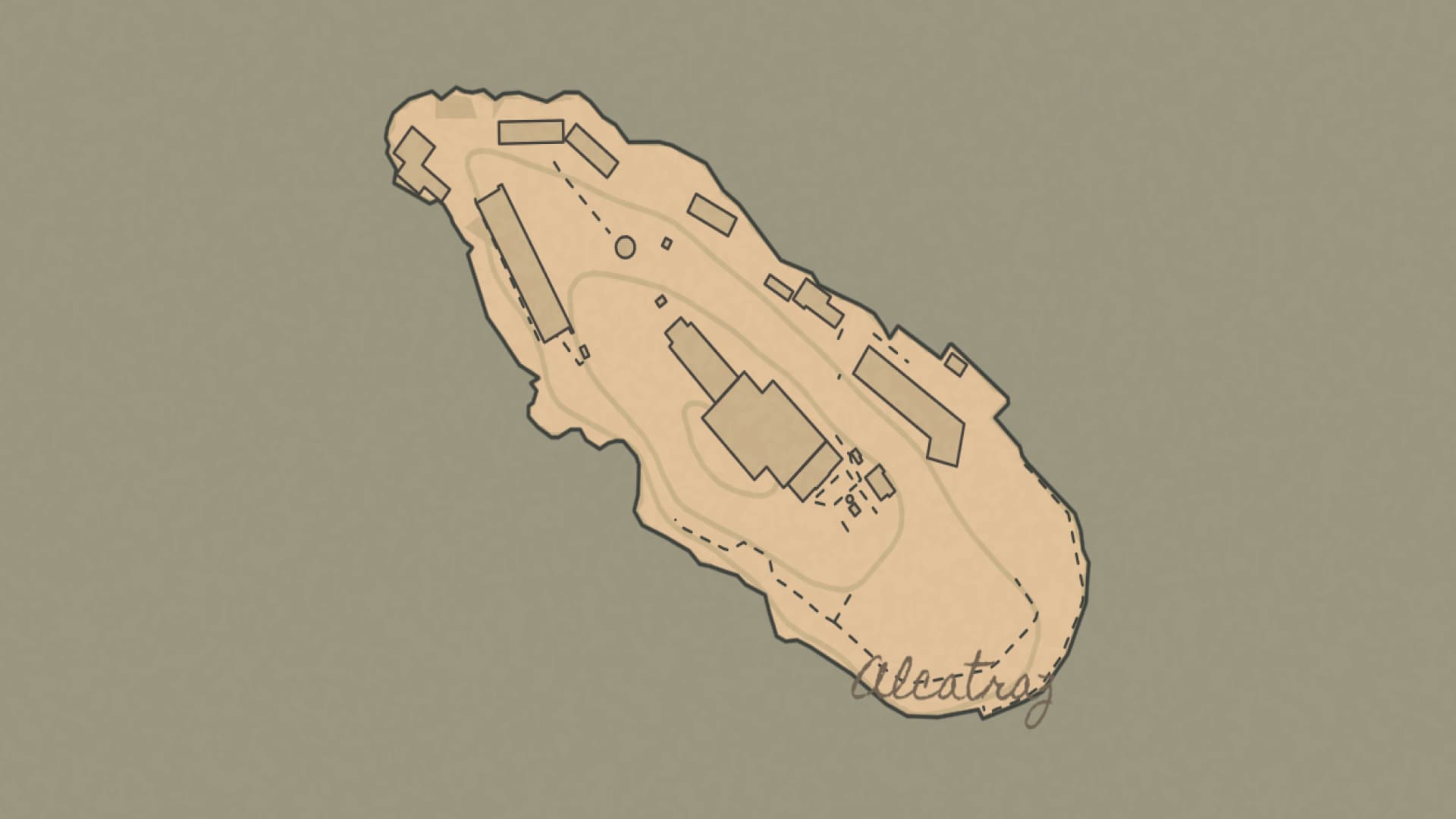
I read it in great detail and tried my best, with the help of Claude, to create my own styles.json file that I could pass to my renderer.
It took some trial and error, and I had to host this json remotely (actually hosted on this domain).
Additionally, the typefaces had to be converted into something called a .pbf file.
All of which is now hosted on this domain.
Bitmap -> Vector
I soon realised that baking all the walks into the bitmap was fairly destructive and I definitely didn't want to store multiple bitmaps per map tile, one for each walk, so I decided to pivot to a Vector method instead.
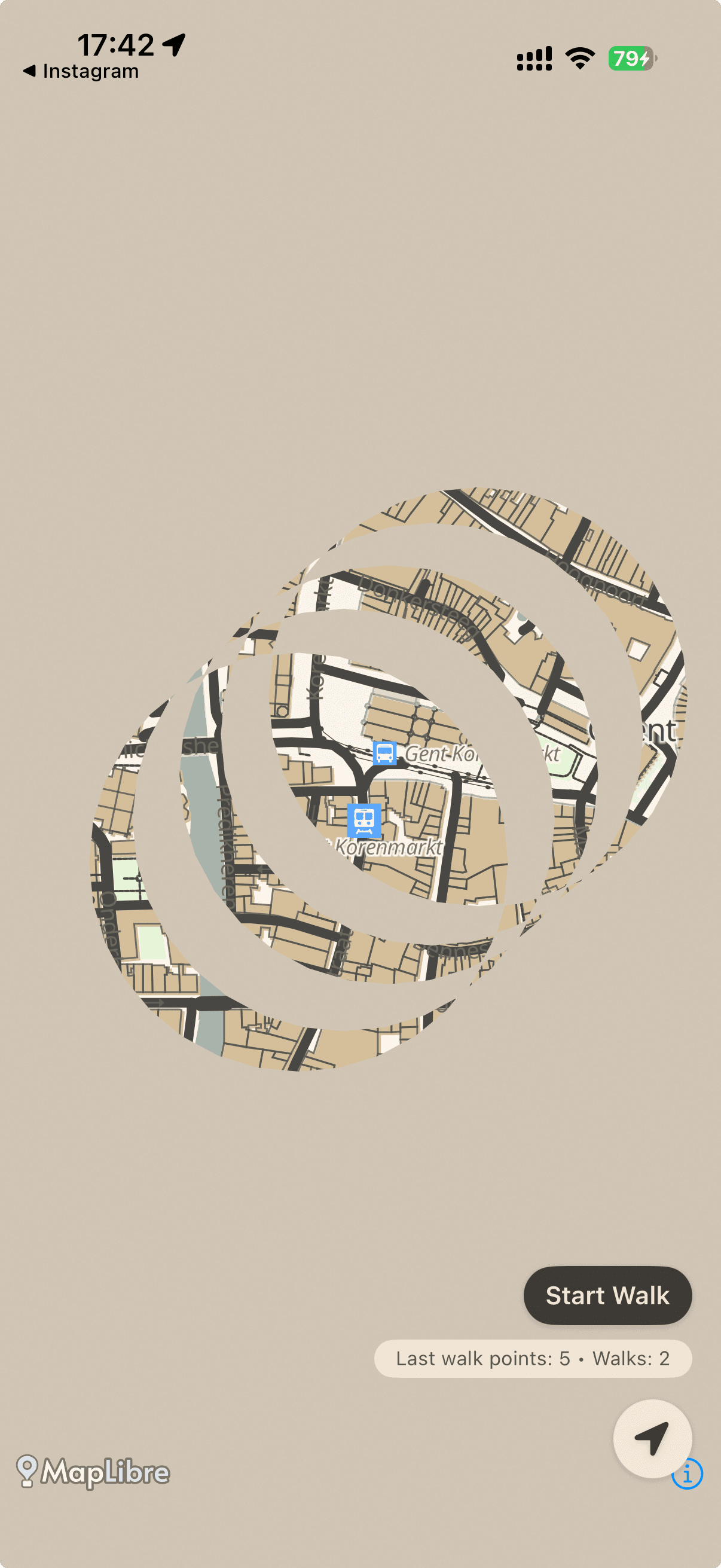
Turns out that listing a number of points, drawing them as circles and then rendering them as an SVG suffers from what I call the even-odd problem. The masking effect isn't combinatory, but instead appears to render the intersection of each shape.
Vector -> Metal Shader
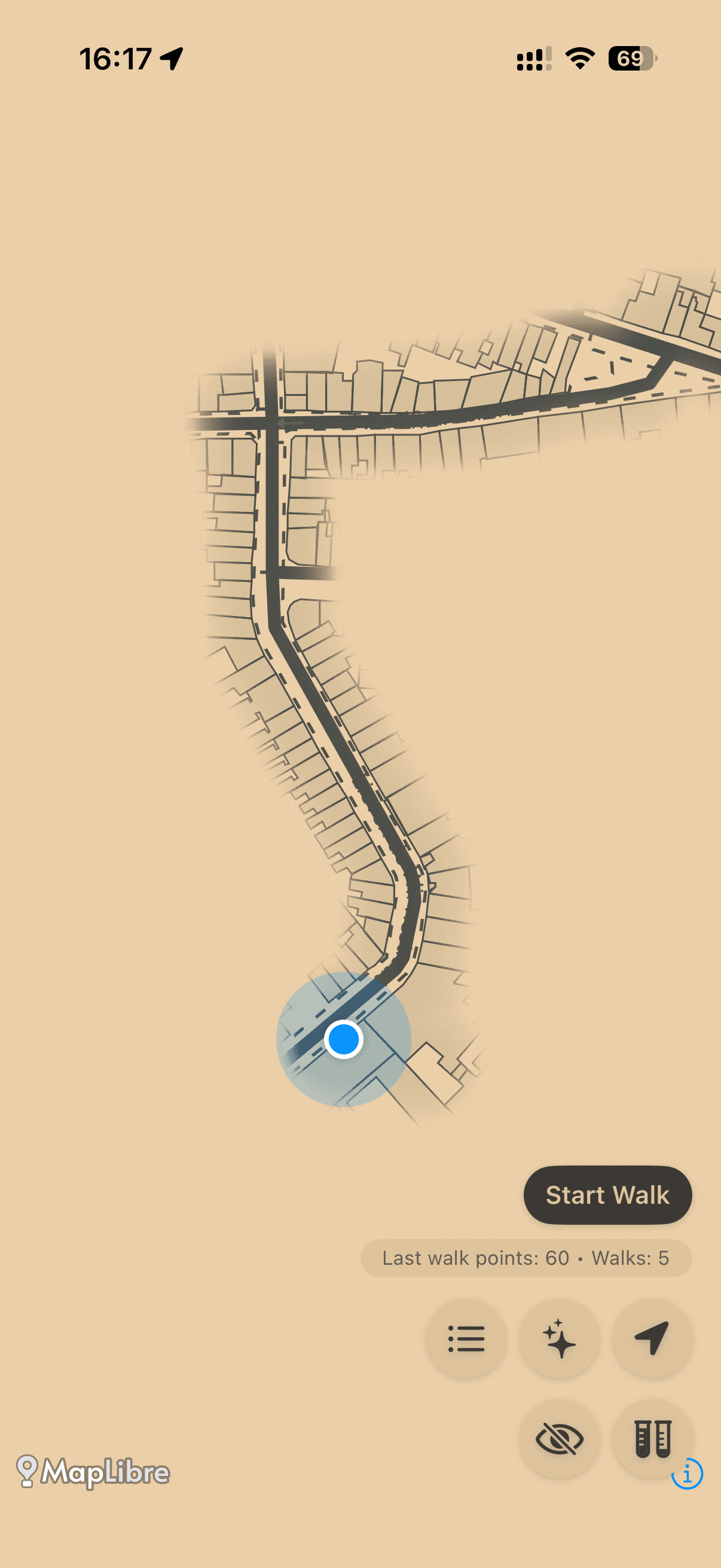
I didn't really realise what I was getting myself into by opening this Pandora's Box, but I trudged ahead and decided to create a shader that would render these paths individually, and mask that onto a solid colour, to reveal the map beneath.
The shader draws a quad inside the MapLibre's render pass. It does this each time the map is re-rendered, which is every frame for when it moves, or zooms.
I built a fragment shader that converts each on-screen pixel to a geographic coordinate (inferred from the 4 pinned corners) and checks the following things to know how "revealed" it is.
The final pixel opacity rendered on top of the map canvas is a function of the fog-colour and blended with a pre-multiplied alpha.
Why?
That's the end of my story for this app (as of writing this), but you may be asking why?
Nobody needs this. It's not really monetised. "I'm sure it exists elsewhere" etc.
I really made this project in an attempt to grant people the ability to find joy again in discovery of new places.
It makes me want to go on aimless walks. Rather than going between A and B, why don't I try to walk somewhere I haven't been before? Who knows what I might find, what cafe I might discover.
I hope this can bring even a small amount of wonder back into people's minds and encourage exploration.