Asterisk Soup
View the repo on GitHubEvery AI model I use spits out Markdown. Claude, ChatGPT (other models are available), with any of them, you ask for anything more structured than a sentence and you get back a .md file stuffed with ## and **bold** and ~~neat~~ little tables. On my Mac that's fine as I suppose the nature of a larger screen is the special characters don't take up much real estate. On my phone, sat on the sofa away from a proper keyboard, it's a mess to decipher.
Tap a .md in the iOS Files app or click on one on your MacOS desktop and you don't get a document. You get what looks like asterisk-soup.
## Heading, | --- |, **bold**—the formatting characters sitting there completely naked and un-rendered. There's no "just let me read this, formatted, like I would a PDF" button anywhere. Your only real options are to install an entire vault app like Obsidian to read one file, or pay an editor's subscription to look at a glorified text file. Both feel like a sledgehammer for a walnut.
No shade on Obsidian by the way. I use it every day, but the problem here is not solved by Obsidian.
So I had an idea. What if .md files felt native on iOS and MacOS?
🔭 A deliberately un-appy idea
I've made a bunch of front-end heavy "experiences" over the years, but I wanted to try something different this time.
I wanted Markdown to behave like a native filetype. Rendered previews, rendered thumbnails in Files, a proper Open With handler, with as little "app" as possible. An OS-level enhancement that does what it says on the tin and then runs and hides.
I did two research passes before writing a single line of code. One on the market, one on the tech, and they both landed on the same cheerful thesis:
- The gap is real and well-documented. No current Apple OS,
macOS 26andiOS 26included, renders Markdown at the preview layer. The single most common complaint online is, almost word for word:
"I just want to double-click and read it."
- macOS already has free tools—
QLMarkdown,PreviewMarkdownthat hook into Quick Look. But on iOS, nobody had shipped a system-level rendered preview. A wide-open wedge. - The technical path looked clean too: a Quick Look Preview Extension, a Thumbnail Extension, register Markdown's de-facto UTI (
net.daringfireball.markdown), aDocumentGroupreader, andMarkdownUIas the rendering engine. It all looked achievable.
That's the trap.
🎯 Betting the whole thing on one test
Both research passes had independently flagged the same riskiest assumption: does the iOS Files app actually bother to invoke a third-party Quick Look preview extension for a .md file? Everything, the entire idea, hung on that one yes.
So rather than build the architecture and find out at the very end, I made the very first task a single make-or-break experiment. I'd read about this concept called a "Spike" in product development:
bet the idea on its scariest question before you've fallen in love with it.
I wrote a throwaway extension whose only job was to slap a giant green ✅ INVOKED banner over whatever file it was handed. See the banner, and we were in business.
Built it. Signed it, which was its own small saga, turns out that working with Claude Code and XCode provided some extra nuance when it came to Apple Developer Teams and signing. Deployed to a real iPhone. Tapped a .md in Files.
Raw text. No banner.
I think I was always gonna try some part of it quickly to see if it would work, and a Spike felt like the right approach, and sure enough, it bounced back a big no.
🧱 The wall
Looking at the logs (streaming through XCode), each time I tapped a .md file in Files, I could see it invoking com.apple.quicklook.UIExtension, its own built-in renderer and never invoked the one we just built. I kinda assumed that this was because we'd built something wrong, or a typo somewhere else.
The code seemed fine, so I did some digging online.
A few forum threads later, it turns out:
"there is no solution"
The rule is this: iOS always uses its built-in viewer for any file type that conforms to public.text, and it will never defer to a third-party preview extension for one. Markdown is, intrinsically, plain text. And UTI conformance is union-only, you can add conformances to a type but you can never remove one. So you literally cannot make Markdown "not text".
Seems kinda annoying, but I presume there's quite a bit of security consideration, or maybe Apple are going to make their own Markdown reader. Not sure.
On the other side of the fence, MacOS doesn't enforce this rule at all, which is exactly why the same kind of extension works fine on a Mac and gets ignored on an iPhone.
At this point, I was a little deflated. I really wanted this to be an iOS focussed project, but that architectural decision meant that one of the features was a no-go.
Glad I did the spike, I suppose!
🔀 So what can "native" still mean?
What else can we do around this to improve the experience, regardless.
The same spike that killed the preview threw up another interesting avenue. Thumbnail extensions are not subject to the public.text rule. They fire on iOS even for text types.
So I built one (I also read that Quick Look gives thumbnails only a small memory budget to keep things snappy, so I leant towards Core Graphics) that draws a little GitHub-style "page": an M↓ header, the document's actual title, a few fake lines of text.
That rendered quite nicely. There was some nuance about positioning and "Retina" displays too, but Claude rattled through that pretty fairly too.
It was actually the first time I gave Claude Code the ability to grab screenshots of my display by itself, so it could check the thumbnail stuff itself.
Anyway, so what does this mean for "Native Feel"? I had to re-define it slightly.
- File-related thumbnails ✅
- A way to open a markdown file and read it, pre-formatted
- (MacOS) A Quick Look extension that renders markdown as best it can.
📖 Building the reader
This part came together fast, which was a nice change of pace. I put the engine in a shared Swift package so the app and both extensions all render from exactly the same code.
MarkdownUIwith its GitHub theme does the heavy lifting. Headings, tables, task-list checkboxes, blockquotes, links. All in native SwiftUI.- I landed on
Highlightr(highlight.jsunderneath), and after squinting at GitHub's default palette and deciding it was a bit flat, switched to the punchieratom-onetheme. ```typescript and ~190 other language tags now flow straight through, exactly like they would on GitHub. - GitHub's alert callouts (
> [!NOTE],> [!WARNING]and friends) aren't built intoMarkdownUI, so I wrote a small parser to split them out and render proper coloured callouts with icons.
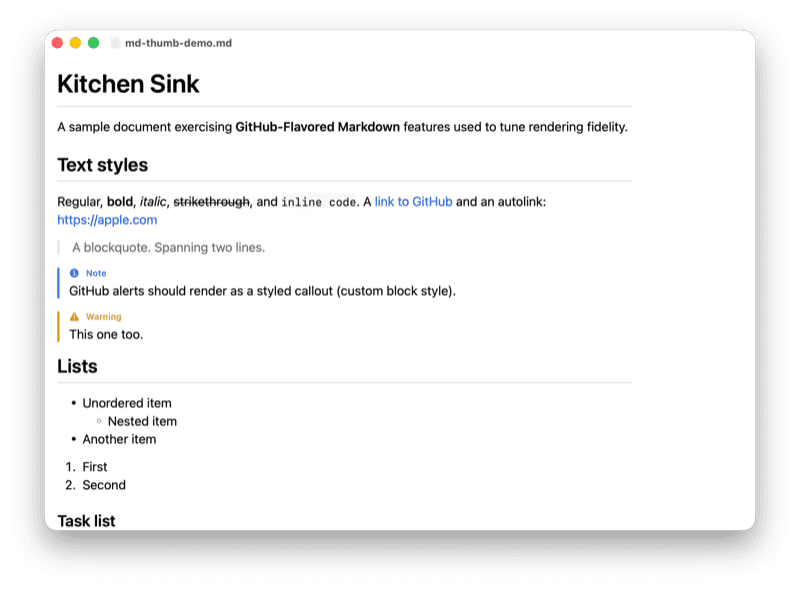
🖥️ The Mac gets the thing the iPhone can't
Now that iOS couldn't render the preview pane, I dove into Mac. With the same engine and the same shared Swift package, I could just as easily power a Mac extension, so I gave it a whirl.
I built a MacOS Quick Look preview extension and it worked first try. Press spacebar on a .md in Finder and up pops the full GitHub-styled render, headings, alerts, syntax-highlighted code, tables, the lot. The exact "native preview" magic that's architecturally impossible on iOS, just... sitting there on the Mac, quietly working.
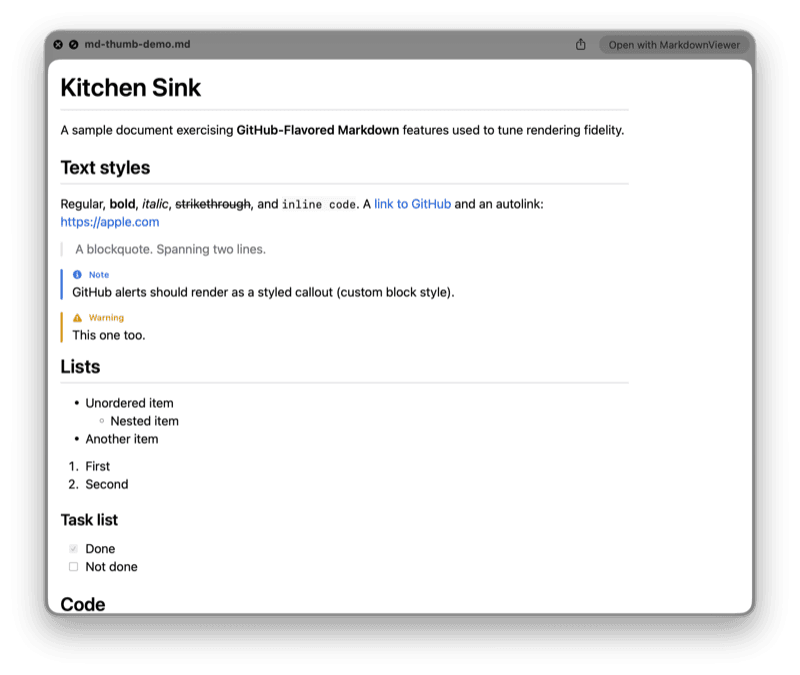
To be fair, this was quite satisfying having battled with the iOS one for such a long time.
👎 Confidently wrong
Claude battled with the next task, which was the Thumbnail stuff, but for MacOS. For some reason, it banged it's head against some sort of wall and flat told me that it's sorry, but thumbnails weren't possible on MacOS in this context.
So let's just check where we are. Surely it can't be this fragmented...
iOS: Thumbnail ✅, Open in reader ❌, Document reader ✅
MacOS: Thumbnail ❌, Open in reader ✅, Document reader ✅
That being said, I was fairly certain that I had read the PreviewMarkdown, another solution could do this. So what was causing Claude to tell me it wasn't possible.
I gave Claude the repo url and it went digging and came back with the classic:
You're absolutely right, my mistake. It's possible after all.
One of the problems was that in order for the Quick Look extension and the Thumbnails to actually catch, you had to restart your machine as it seems they are registered on login.
So I rebooted, cleanly, tried again and the thumbnail extension fired and drew our design exactly as intended. The strange mis-aligned-ness collapsed.
iOS: Thumbnail ✅, Open in reader ❌, Document reader ✅
MacOS: Thumbnail ✅, Open in reader ✅, Document reader ✅
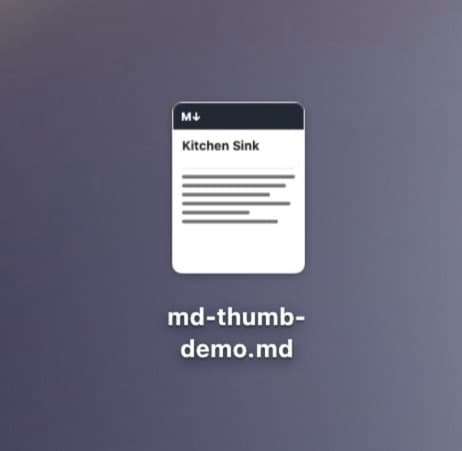
Quite a lot of green ✅✅✅✅✅
🧑🎨 Icon, build, and tiny UI
Now was the easier part. I needed an Icon and a small piece of UI for the MacOS variant that would let the user know what they needed to do to get it to work.
That included things like the Quick Look settings, and restarting their machine.
As of writing this, I have been using it for about a week and have shared a release with some friends and am eagerly awaiting their feedback
🧭 Bottom line
In a world where Markdown has exploded, I suspect that Apple will go ahead and release a native support for it.
I know that there are extensions that can add value, like Mermaid and other stuff and I'm not sure how Apple will handle that, but I hope that this app becomes somewhat redundant in favour of a proper Apple designed, native alternative.
Anyways. Thanks for reading.
You can contribute to the project, which I have made open source here: